
YYCode Automatic Configuration Tool
This document solves one thing: use one command to install Claude Code or Codex and connect it to YYCode. Even if your machine does not have Node.js yet, you can still continue.
1. Create an API Key
The script will prompt you to enter an API Key while running, so first create one in the YYCode console for later use.
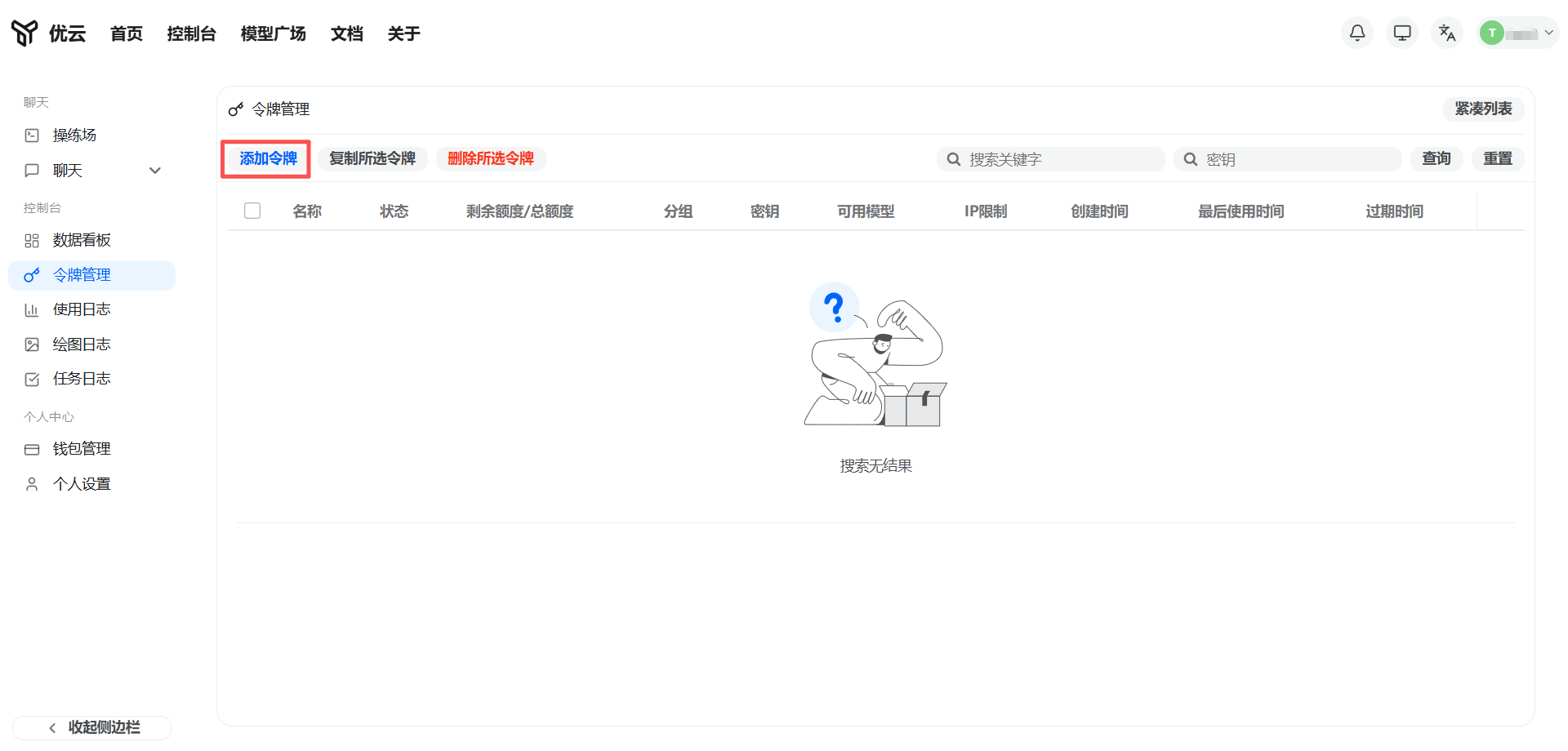
Log in to the YYCode console, go to Token Management, and click Add Token.
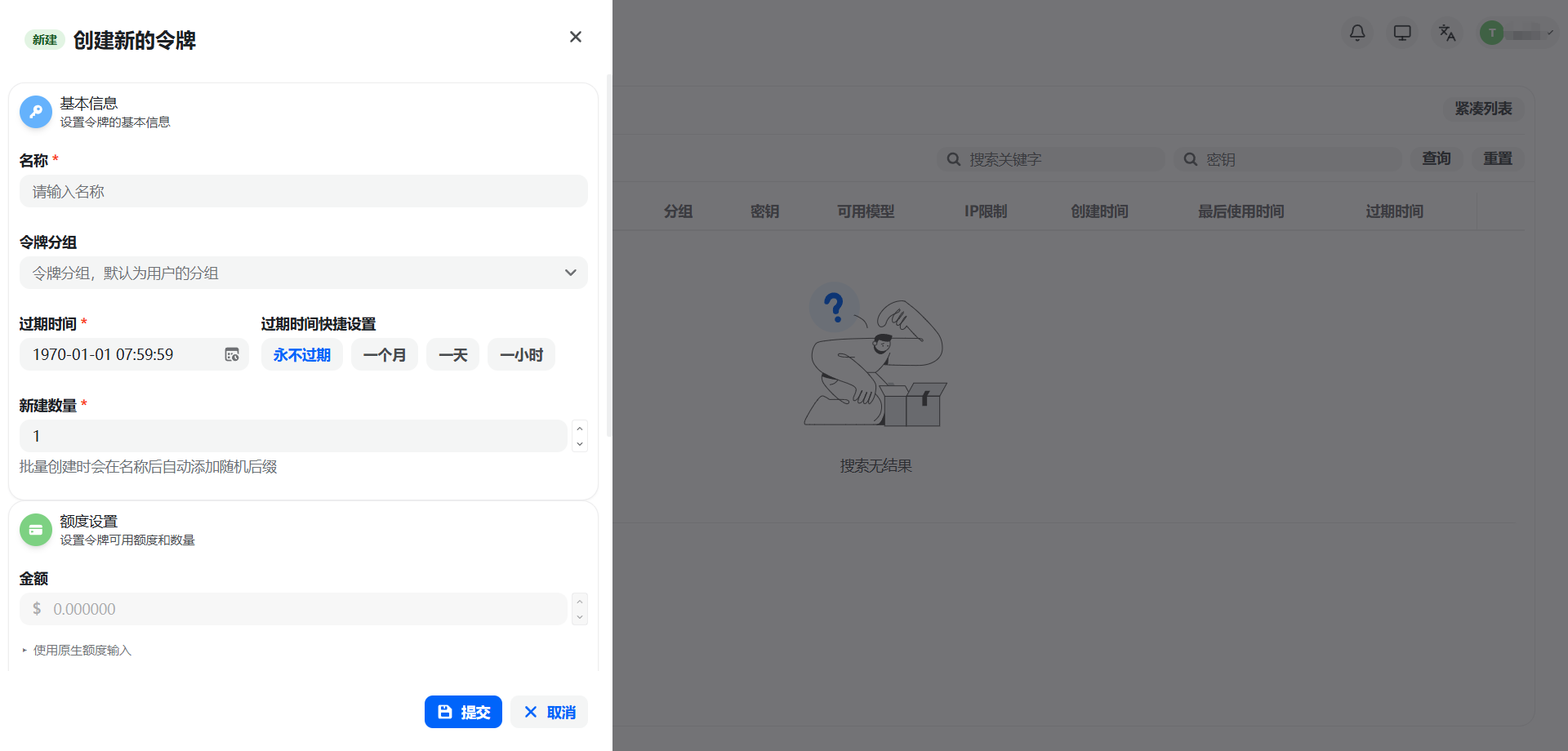
Enter a key name, then choose the group according to the tool you want to use:
- Configure Claude Code: choose a Claude-related group
- Configure Codex: choose the
codexgroup - Configure both: create two separate Keys, each matching one of the groups above
IP allowlist, quota limits, model restrictions, and expiration time can be configured as needed. Beginners are advised to use the default settings.
After creation, click the Copy button next to the key in the list to get the full API Key. Paste it later during the script interaction.
Security note: An API Key is equivalent to account credentials. Keep it safe and never commit it to a code repository or share it publicly.
2. Recommended Usage
macOS / Linux
Run directly:
curl -fsSL https://yycode.net/auto-config/install.sh | bash
The script will automatically:
- Detect whether the current system already has a usable Node.js
- If not, install a local Node.js runtime under the current user's home directory
- Switch the npm mirror to a domestic source to reduce download failures in no-proxy environments
- Install
Claude CodeandCodex - Write the corresponding configuration files
- Finally run version checks to confirm the commands can run
Windows PowerShell
Run directly:
irm https://yycode.net/auto-config/install.ps1 | iex
3. Common Parameters
If you want a fully non-interactive run, you can put the parameters directly in the command.
Note: Claude Code and Codex use different API Keys. When configuring
all, you need to provide two Keys separately.
Configure Claude Code only
macOS / Linux:
curl -fsSL https://yycode.net/auto-config/install.sh | bash -s -- --api-key YOUR_CLAUDE_KEY --tools claude
Windows PowerShell (pipe mode, pass parameters through environment variables):
$env:YYCODE_CLAUDE_API_KEY='YOUR_CLAUDE_KEY'; $env:YYCODE_TOOLS='claude'; irm https://yycode.net/auto-config/install.ps1 | iex
Windows PowerShell (download first, then run directly):
.\install.ps1 --api-key YOUR_CLAUDE_KEY --tools claude
Configure Codex only
macOS / Linux:
curl -fsSL https://yycode.net/auto-config/install.sh | bash -s -- --codex-api-key YOUR_CODEX_KEY --tools codex
Windows PowerShell (pipe mode):
$env:YYCODE_CODEX_API_KEY='YOUR_CODEX_KEY'; $env:YYCODE_TOOLS='codex'; irm https://yycode.net/auto-config/install.ps1 | iex
Windows PowerShell (download first, then run directly):
.\install.ps1 --codex-api-key YOUR_CODEX_KEY --tools codex
Configure Claude Code and Codex together
macOS / Linux:
curl -fsSL https://yycode.net/auto-config/install.sh | bash -s -- --api-key YOUR_CLAUDE_KEY --codex-api-key YOUR_CODEX_KEY
Windows PowerShell (pipe mode):
$env:YYCODE_CLAUDE_API_KEY='YOUR_CLAUDE_KEY'; $env:YYCODE_CODEX_API_KEY='YOUR_CODEX_KEY'; irm https://yycode.net/auto-config/install.ps1 | iex
Windows PowerShell (download first, then run directly):
.\install.ps1 --api-key YOUR_CLAUDE_KEY --codex-api-key YOUR_CODEX_KEY
Custom API Address
If you have deployed a custom domain, you can override the default address:
curl -fsSL https://yycode.net/auto-config/install.sh | bash -s -- --api-key YOUR_CLAUDE_KEY --base-url https://your-domain.example.com
4. Files Written by the Script
Claude Code
The script writes:
~/.claude/settings.json
The core fields are:
{
  "env": {
    "ANTHROPIC_BASE_URL": "https://yycode.net",
    "ANTHROPIC_AUTH_TOKEN": "YOUR_API_KEY"
  }
}
Codex
The script writes:
~/.codex/auth.json
~/.codex/config.toml
auth.json:
{
  "auth_mode": "apikey",
  "OPENAI_API_KEY": "YOUR_API_KEY"
}
config.toml:
model_provider = "yycode"
model = "gpt-5.5"
network_access = "enabled"

[model_providers.yycode]
name = "yycode"
base_url = "https://yycode.net/v1"
wire_api = "responses"
requires_openai_auth = true
5. No Administrator Permissions Needed?
Not by default.
The script first uses the system's existing Node.js if available. If not, it installs Node.js into the current user's directory:
- macOS / Linux:
~/.yycode/node - Windows:
%USERPROFILE%\.yycode\node
Client packages are also installed into the current user's directory instead of the system global directory.
6. What to Do After the First Run
macOS / Linux
After the script finishes, it is recommended to run:
source ~/.zshrc
If you are not using zsh, run source on the actual profile file shown in the script's final output.
Windows
Just reopen a PowerShell window.
7. How to Confirm Success
Claude Code
claude --version
Codex
codex --version
As long as the commands output version numbers, the installation path is usually working.
8. Backup and Rollback
If your machine already has old configurations, the script automatically creates .bak backups before the first overwrite, for example:
~/.claude/settings.json.bak~/.codex/auth.json.bak~/.codex/config.toml.bak
If you need to roll back, restore the corresponding .bak file directly.
9. FAQ
Windows says git-bash is required
Claude Code depends on git-bash on Windows. The script automatically detects and installs Git for Windows (preferentially downloading from the domestic npmmirror mirror), so no manual action is required.
How do I pass parameters in Windows pipe mode (irm | iex)?
You cannot append parameters directly after irm ... | iex; you need to pass them through environment variables:
$env:YYCODE_TOOLS='claude'; $env:YYCODE_CLAUDE_API_KEY='YOUR_KEY'; irm https://yycode.net/auto-config/install.ps1 | iex
If no environment variables are passed, the script will interactively prompt for the API Key.
Can the script run without a proxy?
The script uses domestic mirrors by default first:
- Node.js is preferentially pulled from
npmmirror - npm registry defaults to
https://registry.npmmirror.com
If the mirror fails, the script will also try the official source.
I only want to write configuration, not install clients
Add:
--skip-client-install
This is suitable when you already have claude or codex installed and only want to rewrite the configuration files.
The API address is not https://yycode.net
Use --base-url to override it.
My original configuration was overwritten. What should I do?
First check the .bak backup files in the same directory. The first version of the script already reserved a rollback path for configuration overwrite.
10. Next Steps
- Want manual installation and step-by-step explanations: continue reading the Claude Code Quick Start Guide and Codex Quick Start Guide
- Local environment not ready yet: see the Node.js Environment Installation Guide
- Encounter other common issues: see FAQ